How to track flight prices on Google Flights (and what its alerts miss)
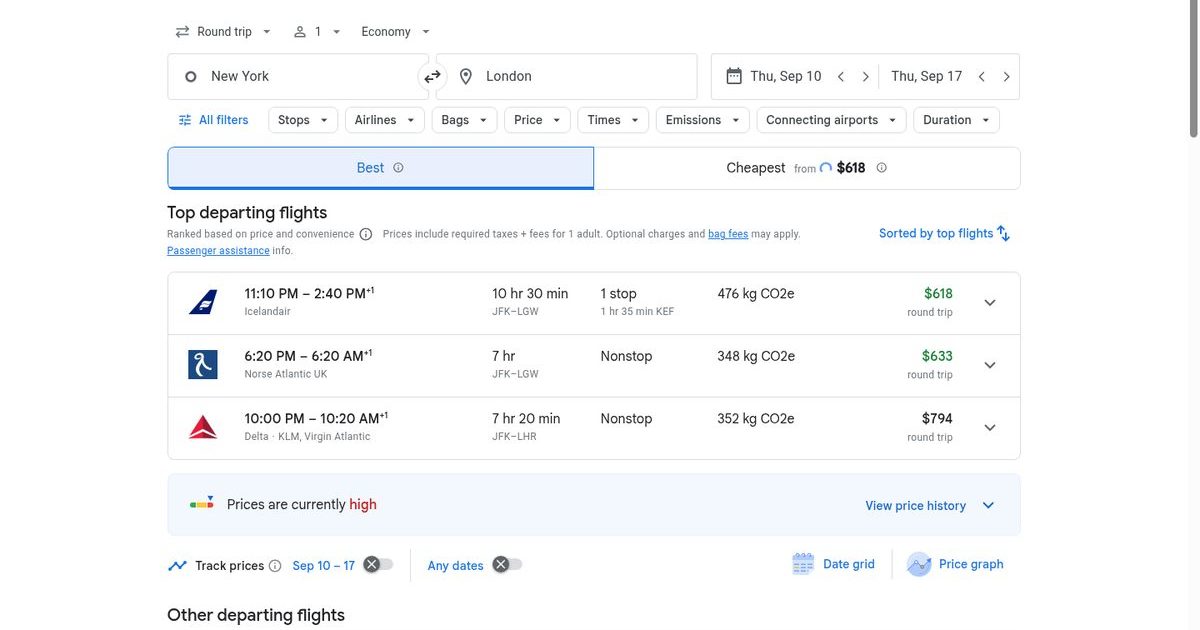
Google Flights price tracking is free, works on any route, and will quietly email you when a fare drops — but only if you set it up the right way. Turn on the Track prices toggle on a search results page (you need to be signed in to a Google account), and Google watches that exact route for you. Here is the full setup, plus the tricks and blind spots Google doesn't explain.
How to track flight prices on Google Flights (4 steps)
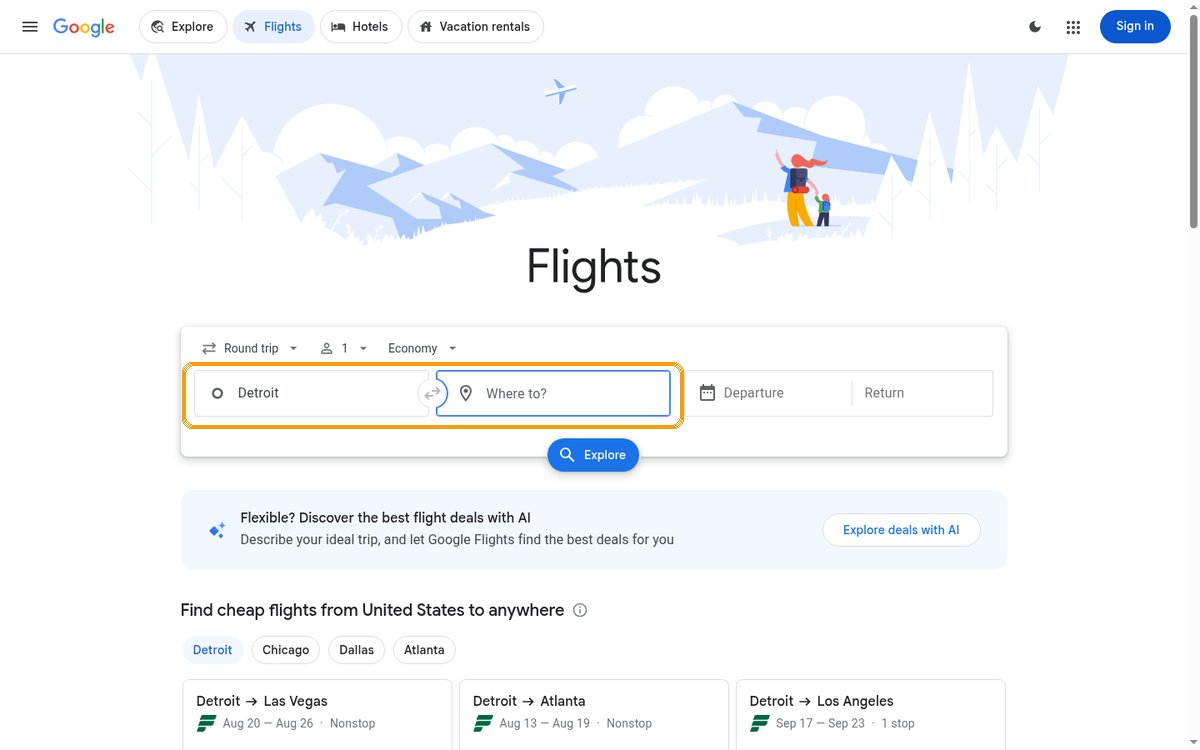
Step 1 — Open Google Flights and enter your route. Go to google.com/travel/flights and type your origin and destination. You can enter a city ("New York") rather than a specific airport — Google then watches all airports in that city, which usually catches more drops.
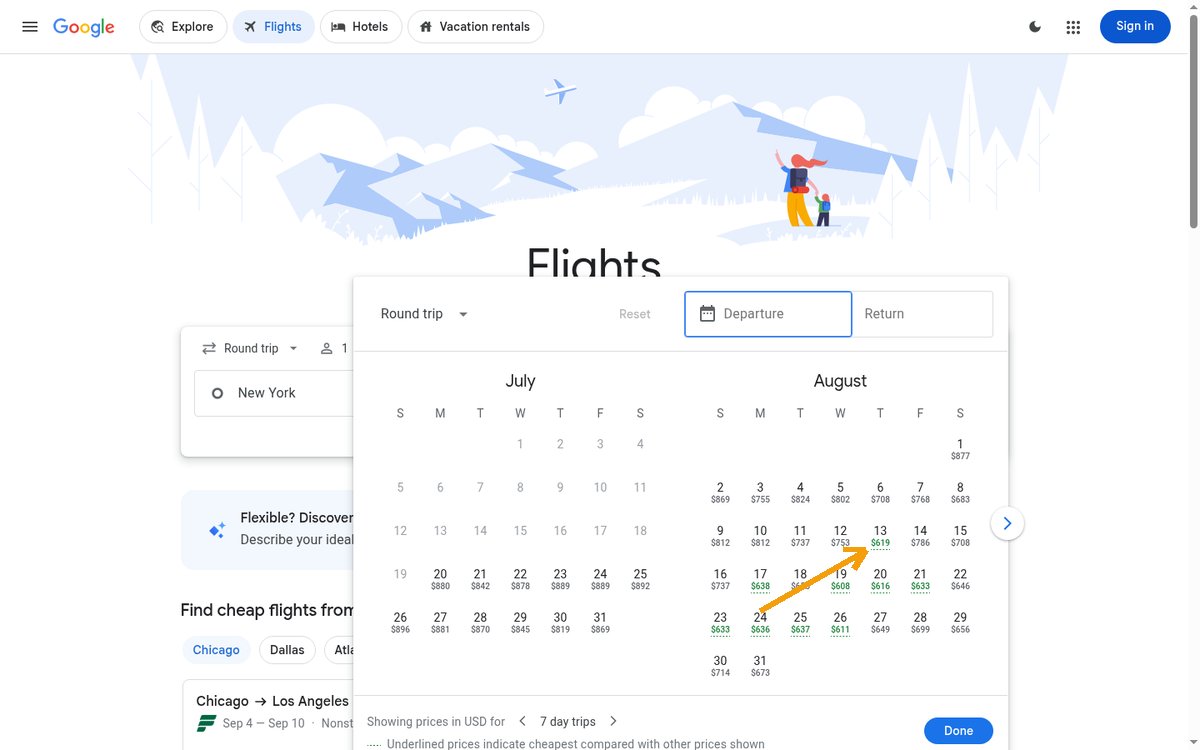
Step 2 — Pick your dates from the calendar. The date picker already shows a price on every day — this is your first savings opportunity before you ever set an alert. Underlined prices mark the cheapest days compared with the dates around them.
Step 3 — Run the search and find the Track prices toggle. It sits directly under the "Top departing flights" list, next to the price-insights banner.
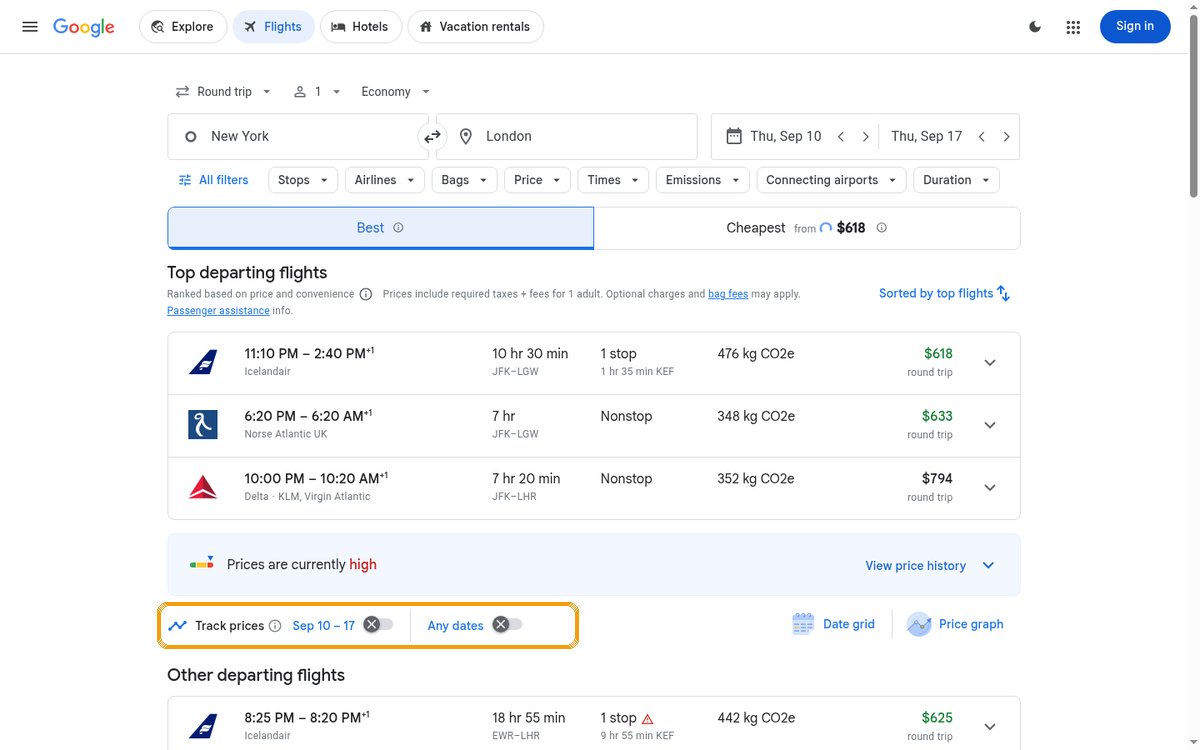
Step 4 — Flip the toggle (sign in if asked). Tracking is tied to your Google account, so a sign-in prompt appears if you're logged out. Once it's on, Google emails you when the price for your tracked search changes meaningfully — both drops and increases.
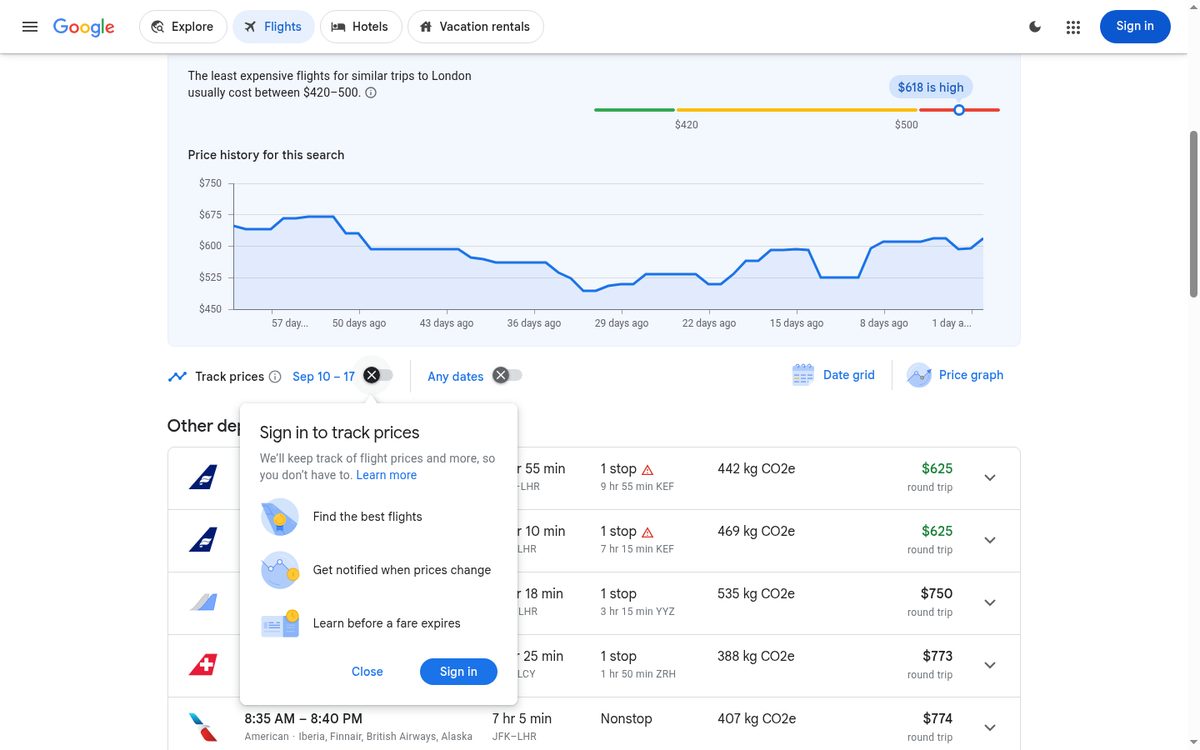
Track a specific flight, not just the route
The toggle on the results page watches the whole route — every airline, every departure time. If you only want one itinerary (say, the Icelandair evening departure), click through the results to select your outbound and return flights. On the final itinerary page, a separate Track prices toggle appears at the top — flip that one and Google watches only your selected flights.
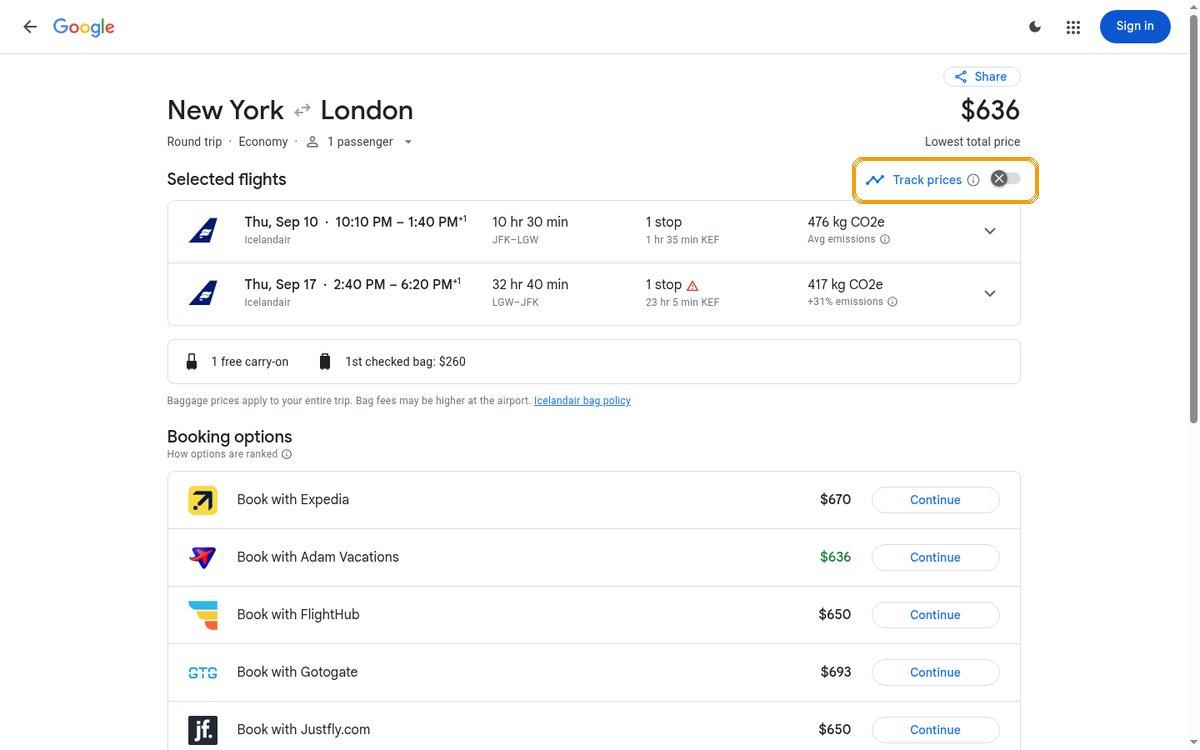
Which to use? Route-level tracking catches more drops (any airline can trigger it); flight-level tracking is quieter and only fires for the exact departure you'd actually book. If you're picky about times or airlines, track the specific flight and you'll never chase an alert for a 6am basic-economy fare you'd never take. Note the bag details on this page too — that $636 Icelandair fare charges $260 for the first checked bag, which changes the math entirely.
The one setting most people miss: specific dates vs. any dates
Next to the toggle, Google offers two tracking modes, and they behave very differently:
- Your dates (e.g. "Sep 10 – 17"): alerts fire only when the fare for those exact dates moves. Use this when your trip is fixed.
- Any dates: Google watches the route across dates in roughly the next 3–6 months and emails you when a notably cheap fare appears on any of them. Use this when you're flexible — it's the closest thing Google has to a standing deal alert.

You can turn both on for the same route. Frequent flyers often track "any dates" on 3–5 dream routes year-round and add exact-date tracking once a trip firms up.
One thing neither mode can express: intent. "Any dates" still means one route, a few months out. If what you actually want is "somewhere warm in February under €1,200, business class", that's not a route — it's a wish. That's the kind of search you can watch on FlightWhisper: describe the trip in plain language, and the radar matches it against verified deals as they surface.
Read the price history before you trust an alert
On every results page, Google shows whether the current fare is low, typical or high for the route, plus a 60-day price history graph. This is the context that makes an alert actionable: a "price drop" email means little if the fare is still in the red zone.
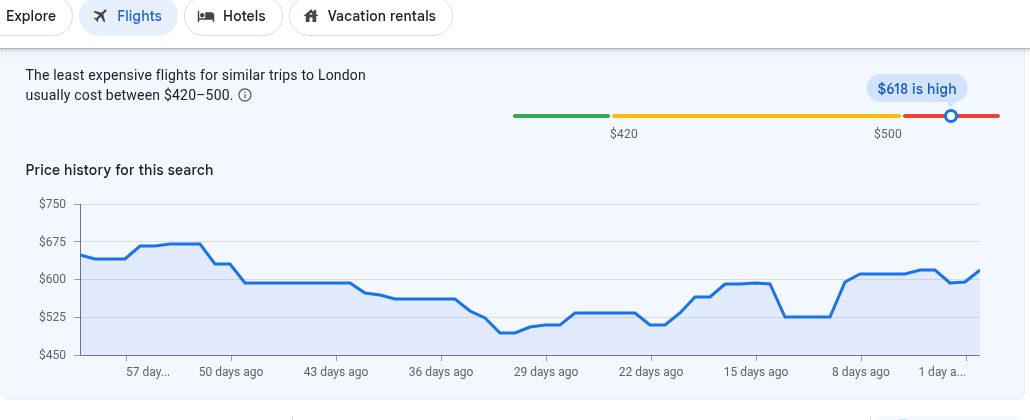
Practical rule: if the banner says prices are high and the history graph shows the fare sat $100 lower within the last month, set the alert and wait. If it says low, book — fares flagged low rarely stay there for long.
Three power tools next to the toggle
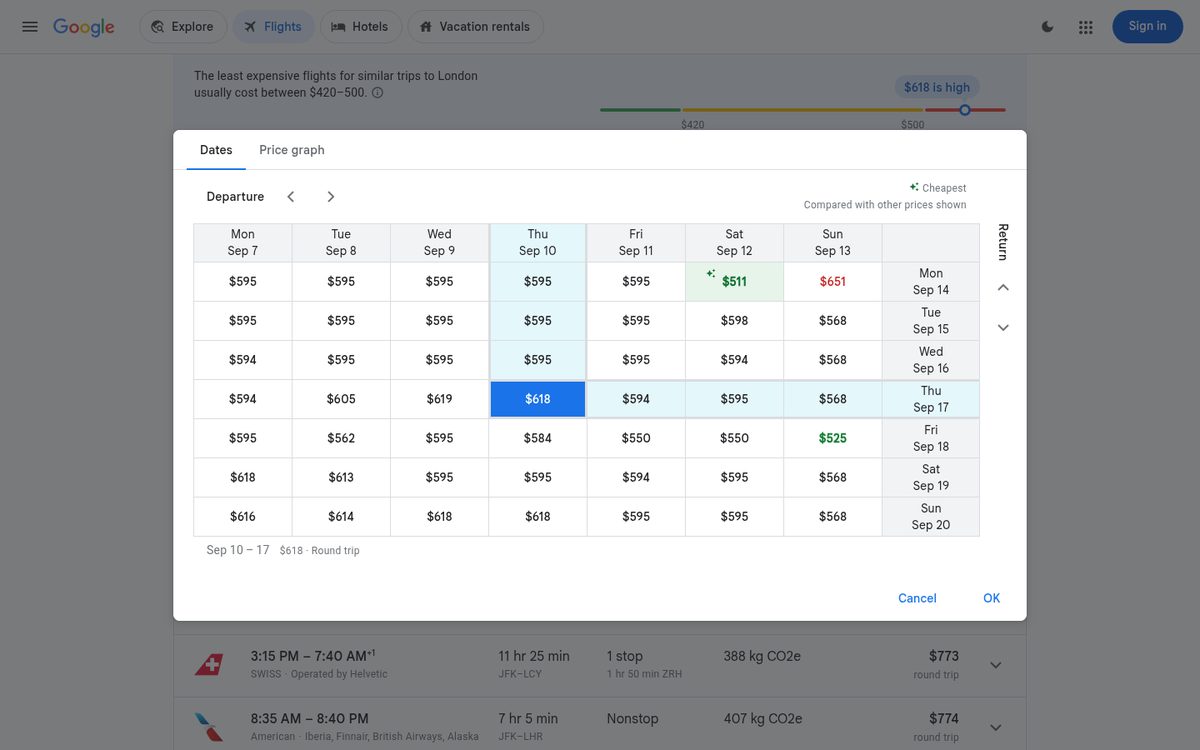
Date grid. A matrix of departure × return dates with a price in every cell. This is the fastest way to see whether shifting your trip by a day or two saves real money — in our test grid the same week cost anywhere from $511 to $651 depending on which exact days we flew. (This day-pair hunting is also the fiddliest part of chasing a deal — it's why FlightWhisper resolves and shows the exact bookable dates on every verified deal, so the grid work is already done.)
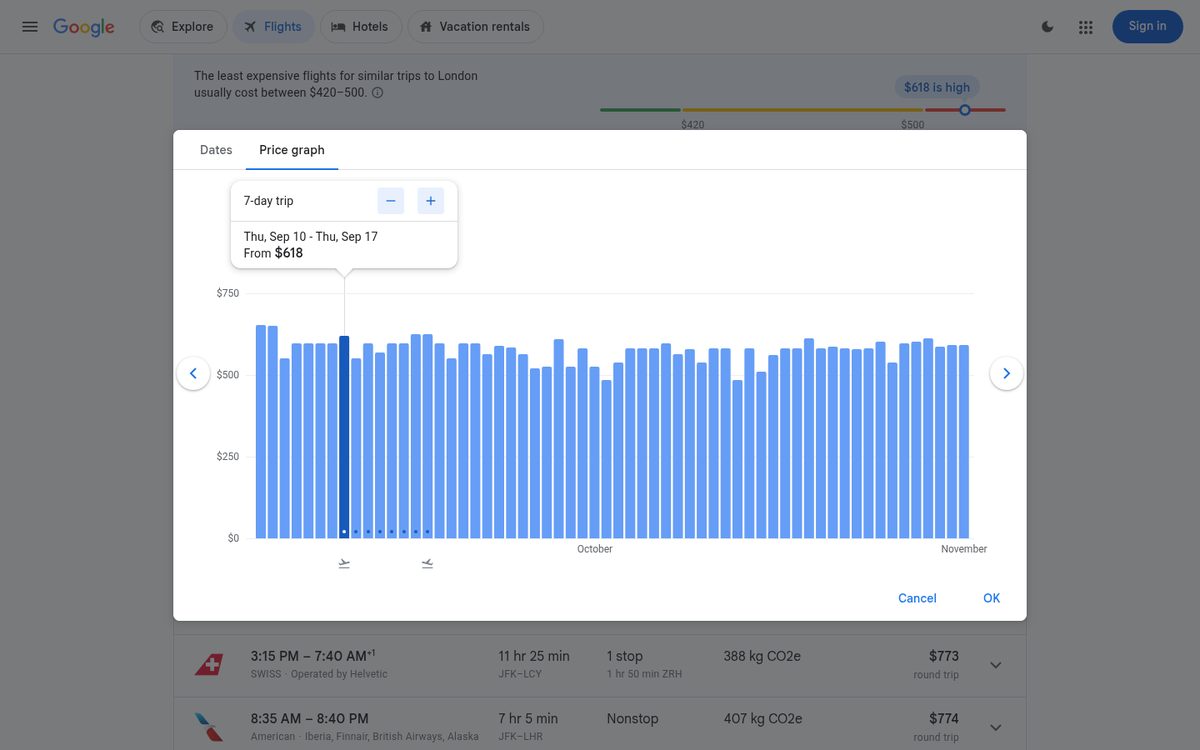
Price graph. A bar chart of the fare for your trip length sliding across the next several months. Drag through it to spot the cheap season at a glance, then set exact-date tracking on the trough.
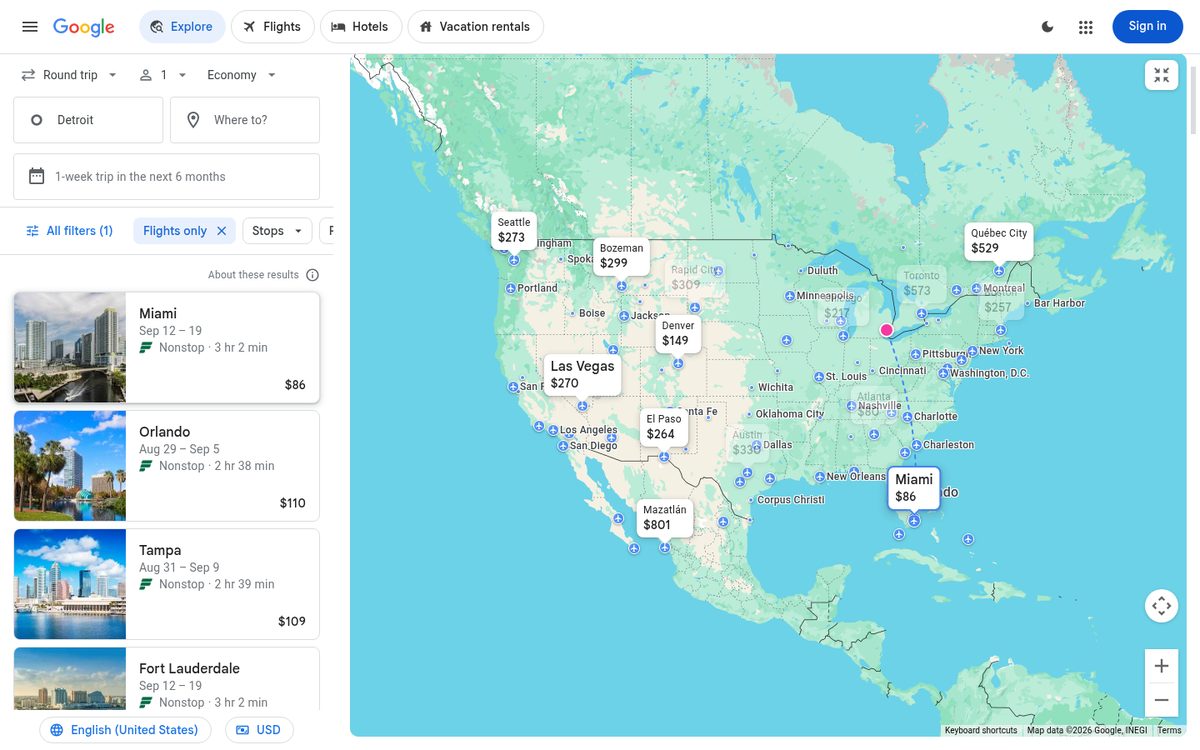
Explore map. If you don't care where you go, open Explore, leave the destination empty, and the map prices the whole world for your dates. Combine it with "any dates" tracking on the routes you like.
Managing your trackers (and reading their history)
Every alert you create lives at google.com/travel/flights/saves — "Tracked flight prices" in the Google Travel dashboard. Each tracker shows its current price and a mini history graph of how the fare has moved since you started watching; the trash icon deletes it. Two habits worth building:
- Check the page weekly rather than trusting your inbox. Alert emails are batched and occasionally skip a change entirely — the saves page is always current.
- Prune ruthlessly. Trackers for trips you've taken or abandoned keep emailing; a short list means the alerts you do get still mean something.
Keep tracking after you book (the rebooking trick)
Here's the tip most tutorials skip: don't delete the tracker once you've booked. Most major US airlines dropped change fees on standard economy and above. If the fare falls after you've bought, you can often cancel or change the booking and pocket the difference as an airline credit or voucher.
- Works on main-cabin and higher fares on carriers like Delta, United, American and Alaska — not on basic economy, which can't be changed for free.
- When the drop alert arrives, price your exact flight again, then rebook or request the fare-difference credit through the airline's "change flight" flow.
- Sanity-check the difference against any rebooking hassle — a $15 drop isn't worth it; a $150 one is a free hotel night.
Price movement doesn't stop at booking — in our radar data, fares on verified deals keep shifting right up to departure. The tracker you set to catch a deal going in can catch a refund coming out.
Tips & tricks that make alerts actually useful
- Track a city pair, not an airport pair. "New York → London" watches JFK, EWR and LGA against LHR, LGW, LCY and STN. Airport-level tracking silently ignores fares from the airport next door.
- Set alerts 2–4 months out for short-haul, 3–8 months for long-haul. Tracking a route the week before departure mostly documents the price going up. Across 536 deals we verified with real booking data, arriving late to a fare cost a median of +14% over the advertised price.
- Expect a digest, not a siren. Alert emails are batched and can lag a drop by hours or a day. Flash fares lasting a few hours are often gone before the email lands — it's why our own radar re-checks its deal list every 15 minutes instead of once a day.
- Check bag rules before celebrating. The headline fare on cheap transatlantic results is often a no-bag basic fare on carriers like Norse or Icelandair; add the real luggage cost before comparing with the alert price.
- Don't anchor on the alert price. Click through to the airline before deciding — the fare can differ slightly from the tracked price in both directions.
Perks and fine print Google doesn't advertise
The price guarantee badge — Google pays you if it's wrong. On a small set of itineraries, Google is so confident the fare won't drop that it shows a colored shield badge. Book a badged itinerary (every flight in it must carry the badge) and Google monitors the price daily until departure — if it falls by more than $5, Google pays you the difference via Google Pay, up to $500 per year across three active guarantees. The fine print: it's a US-only pilot — you must be signed in, searching in USD with US region settings, and the badge mostly appears on itineraries departing within about 60 days, most often on Alaska, Spirit and Hawaiian. We ran a New York → LA search for this guide and got no badge — treat it as a nice surprise when it appears, not something to hunt for.
What actually triggers an alert email. Google doesn't email every $5 wiggle — alerts fire on significant changes, and Google decides what counts as significant. If your tracker has been silent for weeks, that usually means the fare has been flat, not that tracking is broken. The saves page always shows the live price; the email is a convenience, not the source of truth.
Your search currency and region change what you see. Tracked prices follow the currency and country settings you searched with. The same route can price differently between google.com in USD and your local Google domain in EUR — occasionally by enough to matter. Pick the settings you'd actually book with (bottom of the Google Flights page), and keep them consistent, or your alerts will compare apples to oranges.
Filters shape the tracker. Stops, airline, times and bag filters you apply before flipping the toggle are baked into what gets tracked. Filter to nonstop-only first and your alerts will never tease you with a 2-stop fare you'd never book. This is the cleanest way to make alerts match your actual standards.
No, searching repeatedly doesn't raise your price. The folk belief that Google hikes fares for repeat searchers doesn't hold up — price changes you see between searches come from Google's results refreshing and genuine fare volatility, not your search history. You don't need incognito mode to set up a tracker.
What Google Flights tracking won't do
- It doesn't see everything. Southwest and some low-cost and charter fares don't appear in Google Flights at all, and award-ticket (miles) availability isn't covered.
- It only watches what you tell it to. Tracking is per-route. A spectacular mistake fare from your home airport to a city you never thought to track will never reach your inbox.
- It can't handle fuzzy intent. "Somewhere warm in February under €1,200 in business class" isn't a route — and that's exactly the kind of search where the biggest bargains hide.
None of this makes Google's tracker bad — it makes it one half of a system. Route alerts cover the trips you've already decided on; a deal radar covers the trips you haven't. Here's how the two compare:
| Google Flights alerts | FlightWhisper | |
|---|---|---|
| You give it | A route + dates | A wish in plain language |
| It watches | Google's fare inventory for that route | Deals heard across dozens of curated deal blogs, forums and newsletters, plus a broader automated web scan |
| Refresh | Batched email, up to a day behind | Re-checked every 15 minutes |
| Mistake & flash fares | Only if they hit your tracked route in time | Core use case — that's what the radar listens for |
| Award (miles) deals | Not covered | Not currently supported — cash fares only |
| Best for | A trip you've committed to | Trips you'd take if the price appeared |
Try the other half: type your dream trip the way you'd say it out loud — "business class from Prague to somewhere warm in February under €1,200" — and see what the radar has already heard. Search FlightWhisper free →
FAQ
Is Google Flights price tracking free? Yes — completely free. You only need a Google account.
How often does Google check prices? Continuously, but alert emails are batched — typically at most one or two per tracked search per day.
Can I track prices without a Google account? No. The toggle prompts a sign-in; alerts are stored on your account and sync across devices.
Where do I see all my tracked flights? At google.com/travel/flights/saves — the "Tracked flight prices" page lists every alert with its current fare.
Does Google Flights predict if prices will drop? It shows price history and flags fares as low/typical/high, and on some US routes it offers a price guarantee badge. It won't promise a future price — treat the history graph as your guide.
Is there a Google Flights app? Not anymore — Google retired the standalone app years ago. On your phone, use google.com/travel/flights in the browser or the Google app; trackers sync to your account either way.
Can I track one-way and multi-city trips? One-way: yes, works exactly like round-trip. Multi-city: no — the Track prices toggle doesn't appear on multi-city searches. Track the individual legs as one-ways instead.
Why didn't I get an alert for a deal I saw elsewhere? Either the fare wasn't sold through channels Google indexes (e.g. Southwest), the drop was too brief for the email batch, or it was on dates/airports outside your tracked search.
Prepared with automated analysis and editorial tools. See each article for its sources and limitations.
Ask FlightWhisper for a trip →